No .php, No Problem: Executing PHP Through Unexpected Paths
In a recent project i came across a file upload function which i really love to spend time understanding how it exactly works to ensure either it can be exploited or not. the interesting thing which makes me write this blog is the bypass idea which is not really common and btw i spent much time chatting with ai platforms to get suggestions and none of them directed me through this path to be honest it was 6 months ago so maybe it can now :“D

Understanding Behavior
The application is a php one built on top of a famous CMS. First thing is understanding if the upload we make can be accessed through web or not in this case it is accessible at attachments/filename. then trying the basic .php file extensions we got The File is not allowed message, of course i have tried .php7 and other variants but non worked.
I even tried .png , .jpeg and they returned the same error message. the client side code was showing only PDF is allowed so i tried uploading a pdf file and it was accepted.
after some basic tests it truned out the backend code has a security check aganist magic headers so it can know this is a pdf file based on the headers and if returns application/pdf file is considered a pdf and continue execution otherwise it will return the error message.
So here are 2 tips u need to know to be aligned with me in the rest of the blog :
-
File Extenstion is the one that determines how Sytem will handle it , for example uploading
filename.pdfwith malicious content is not a Bug usually as system will always treat it as pdf file. -
php and some other langauges parsers can look into garbage and parse only code between
<?php >or<? ?>as shown below
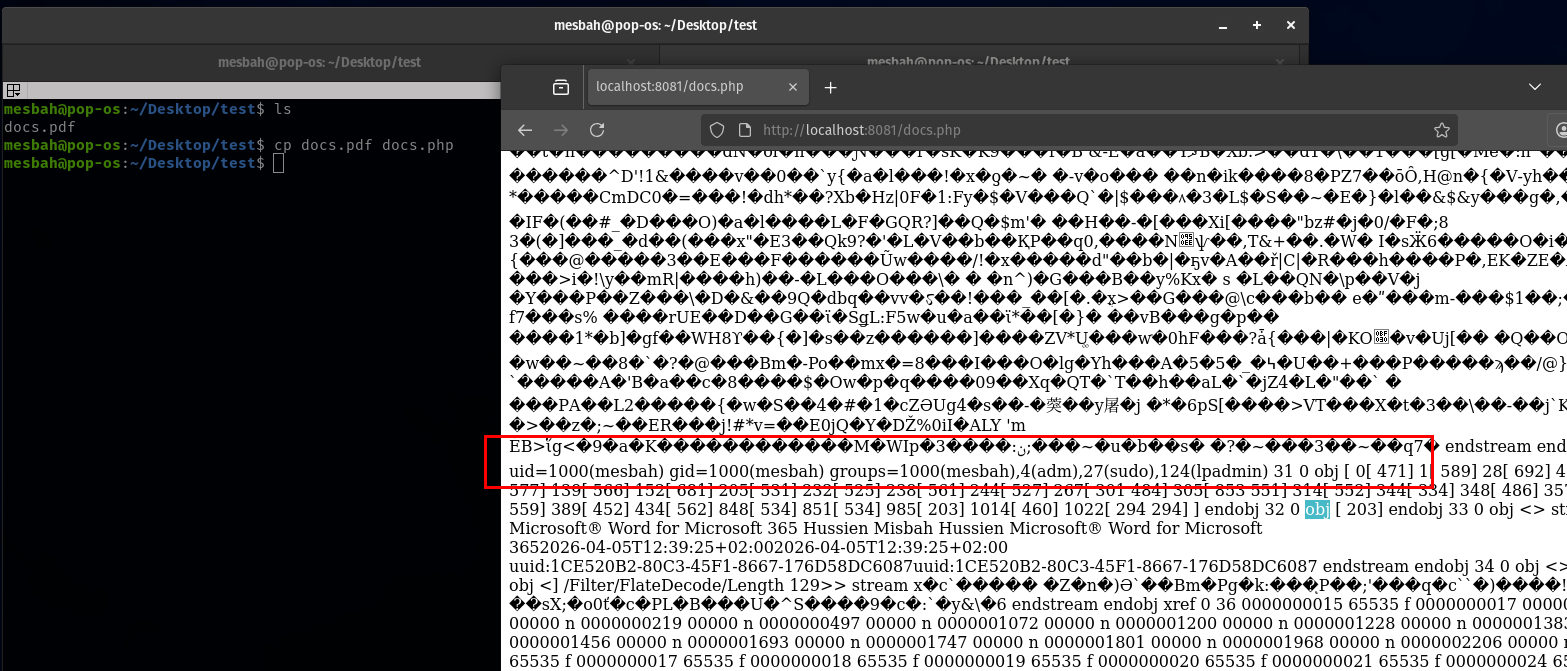
so crafting a pdf file with correct pdf headers and inserting php code inside and using extenstion .php and uploading it to the website also fails with error The File is not allowed message (doing this with html content inside and .html worked though to get xss).
The upload function here is doing mime check and also checks file extenstions and explictily blocking php* extenstions.
another interesting thing here is it doing a third security check using nodes traversal , by mistake i was trying <?php ?> with .html and it was blocked with malicious content detected error message however doing basic <h1> was working. this behavior caught my eyes to investigate more which confirms it doesn’t only check for word <?php in code instead it travese the nodes as in pdf file structure checking for non allowed nodes names.
Finding unexpected bypass path
another fact that matters in our case is the operating system used is windows and web server is apache2 , while looking around for potential bypasses for the extension blocking found literally in the OWASP Guide the key here:
Using NTFS alternate data stream (ADS) in Windows. In this case, a colon character “:” will be inserted after a forbidden extension and before a permitted one. As a result, an empty file with the forbidden extension will be created on the server (e.g. “file.asax:.jpg”). This file might be edited later using other techniques such as using its short filename. The “::$data” pattern can also be used to create non-empty files. Therefore, adding a dot character after this pattern might also be useful to bypass further restrictions (.e.g. “file.asp::$data.”)
Here is an example of Creating ADS for a file in Windows:
uploads>echo "<?php phpinfo(); ?>" > test.pdf:php

uploads>dir

04/30/2026  06:17 PM    <DIR>          .
04/30/2026  05:37 PM    <DIR>          ..
04/30/2026  06:18 PM                32 test.pdf
               1 File(s)             32 bytes
               2 Dir(s)  103,988,277,248 bytes free

uploads>dir /r

04/30/2026  06:17 PM    <DIR>          .
04/30/2026  05:37 PM    <DIR>          ..
04/30/2026  06:18 PM                32 test.pdf
                                    24 test.pdf:php:$DATA


uploads>more < test.pdf:php
<?php phpinfo(); ?>
Using ADS with functions related to filewrite/upload can cause unexpected behaviors in webapps , as this was a blackbox it was not really clear what kind of processing was done on the filename but after uploading a pdf file content with php tags inside and filenamed file.pdf.:php it was uploaded successfully and i can access file.pdf.php !
- most likely now when checks extenstion it is
.pdfor.:phpwhich is not.php*blacklist - the post processing was stripping special chars like
:|_from filename before saving (just guessing).
Bypassing Nodes Traversal Check
however a new error was encountred which is malicious content detected due to the use of <?php > tags , also using <? ?> didn’t work. as i mentioned before it was doing nodes traversal searching for malicious tag instead of just searching for the string <?php in content.
to get the idea of nodes traversal check (usually developers don’t write this by hand and just use a library implements this internally) check this example :
<body>
  <div>
    <h1>Hello</h1>
    <p>
      Click here
      <a href="#" onclick="alert(1)">link</a>
    </p>
  </div>
</body>
For the code above if we want traverse the tree of nodes will be mapped into :
document
 └── html
      ├── head
      │    └── title
      └── body
           ├── h1
           └── p
                └── a
in our case it was doing that and checking if the node name is <?php or <? .
it was quiet easy to bypass this step by creating html tags like <img> which is considered a safe node when it traverse it but on the onerror event just add <?php system('id'); ?> which bypasses the check and finally it gots executed.